Portfolio 2026

New Jersey · Portfolio 2026

Diana Fitter

Senior UX Designer

I turn dense systems — SaaS platforms, admin portals, learning products — into interfaces that explain themselves. I work from research to handoff, and I build the design system on the way out.

Certified Trusted Tester — DHS / Section 508 3× APEX Award winner Design systems in Figma Empathy User research Wireframing Prototyping User flow Collaboration Visual & UI Information design Critical thinking Communication

Selected work

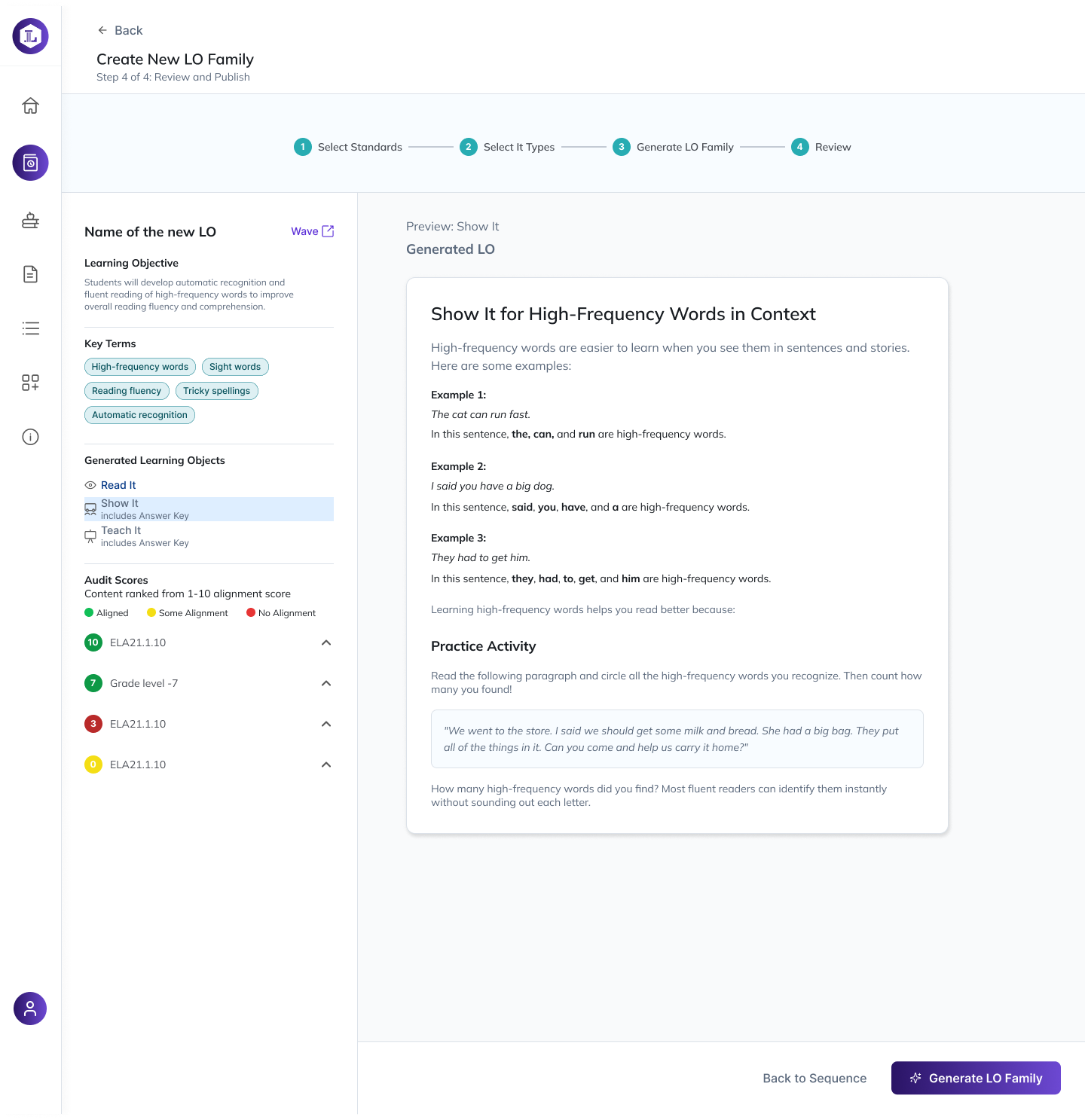
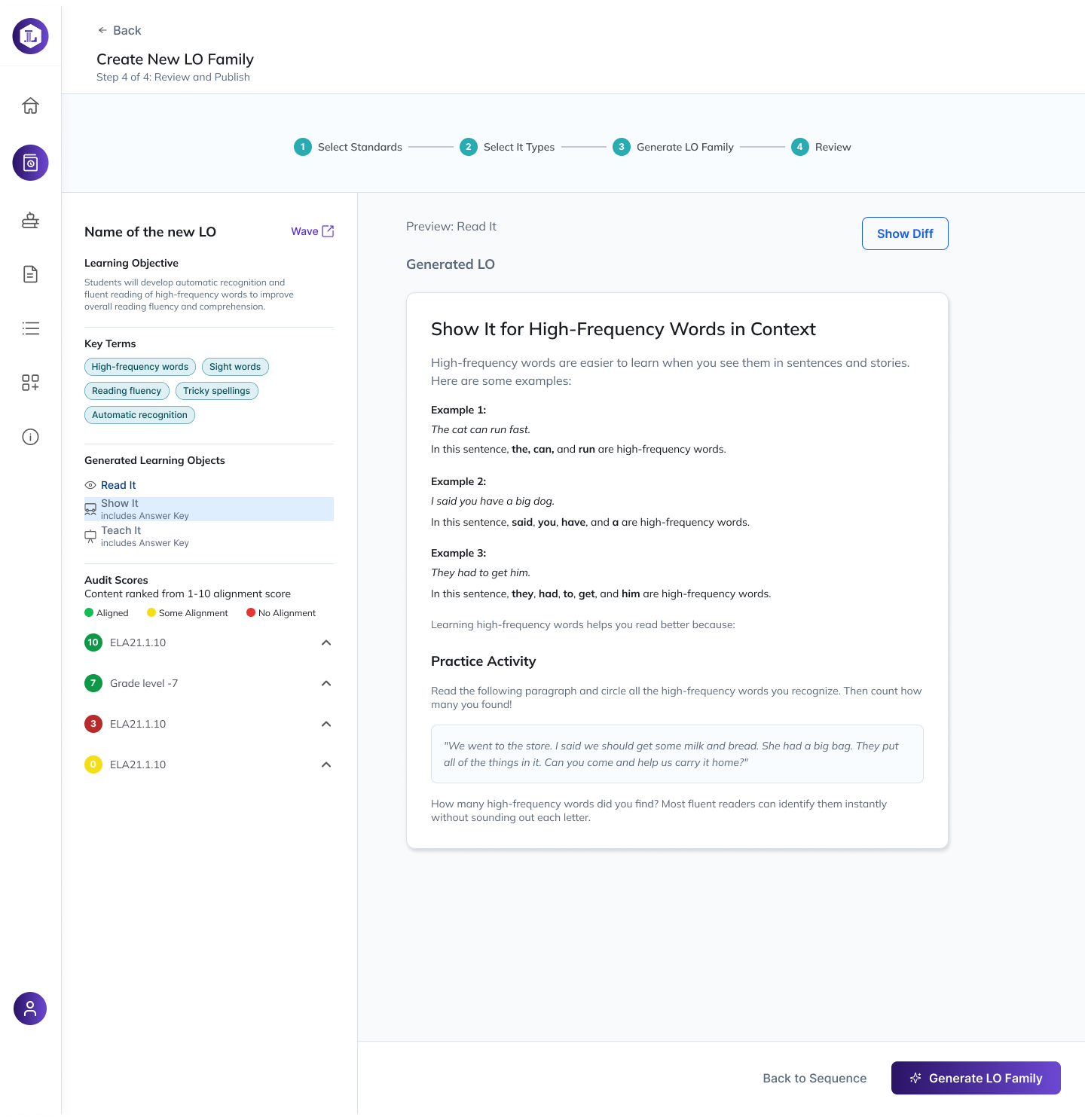
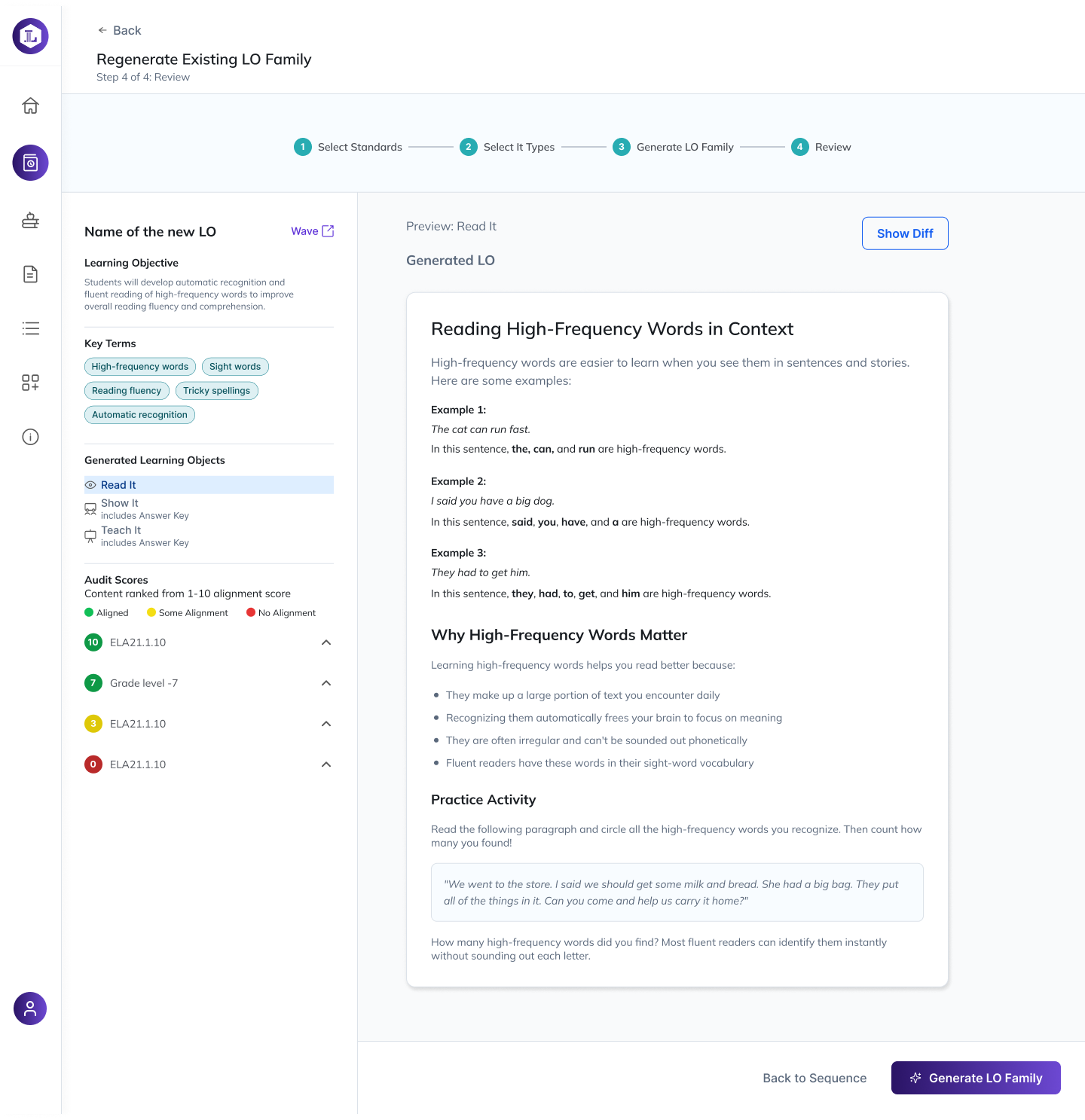
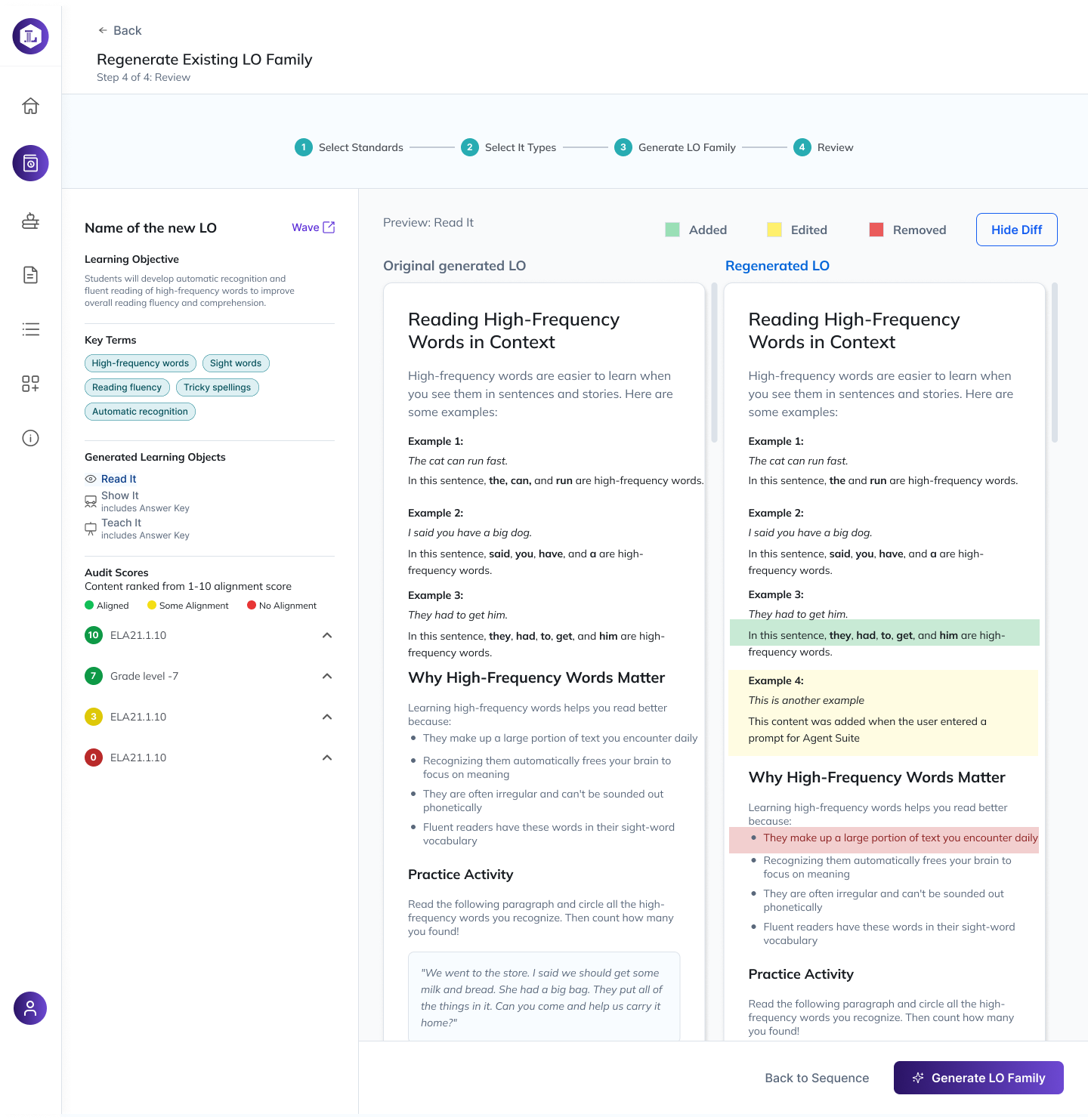
Create New LO Family, step 4: review and publish, with the generated Show It learning object previewed beside audit scores Create New LO Family review screen showing the Show It preview and key terms panel Regenerate Existing LO Family review screen with the Read It preview and Show Diff control Regenerate Existing LO Family diff view: original and regenerated learning objects side by side with added, edited and removed content highlighted
Sequence Studio — the LO Family authoring flow. The generator proposes; the reviewer decides. Audit scores sit beside the draft so alignment is visible before publish, and the diff view makes every AI edit explicit — added, edited, removed — rather than asking anyone to trust a silent rewrite.

My role

UX design lead — sole designer, embedded in an Agile team

Scope

Two user types, AI-assisted workflows, full component library

Shipped

Prototypes, rebrand, and a Figma system now in development

The problem

The platform had grown feature by feature, and every screen assumed you already knew the system. Two audiences — the internal team who run the product and the customers who use it — were sharing one undifferentiated interface, so both were doing work the software should have done for them. There was no component library, no type scale, and no agreed visual language, which meant every new feature reopened settled questions.

Key decisions

  1. Split the experience by user type before touching a single screen. I mapped both journeys side by side and found the overlap was smaller than everyone assumed. That let me give each audience a home that answers its own first question instead of a shared dashboard that answered neither.
  2. Made the AI a suggestion, not a decision. Early concepts had the model act and then report. Research sessions showed users didn't trust that, so the pattern I shipped proposes, explains its input, and waits — with a visible path to override.
  3. Built the design library as I designed, not after. Components and the rebrand landed in Figma in the same sprint as the flows they came from, so handoff was a walkthrough rather than a translation.

Outcome

Took the platform from concept to a complete, accessible design handed to engineering, plus the first design system and rebrand the product has had. Research findings from live sessions went straight into the flows, and every screen was checked against WCAG 2.1 before it left my file.

Remaining screens are under NDA while the platform is in development. I walk through the full flow, the rejected AI-first direction, and the component library live in interviews.
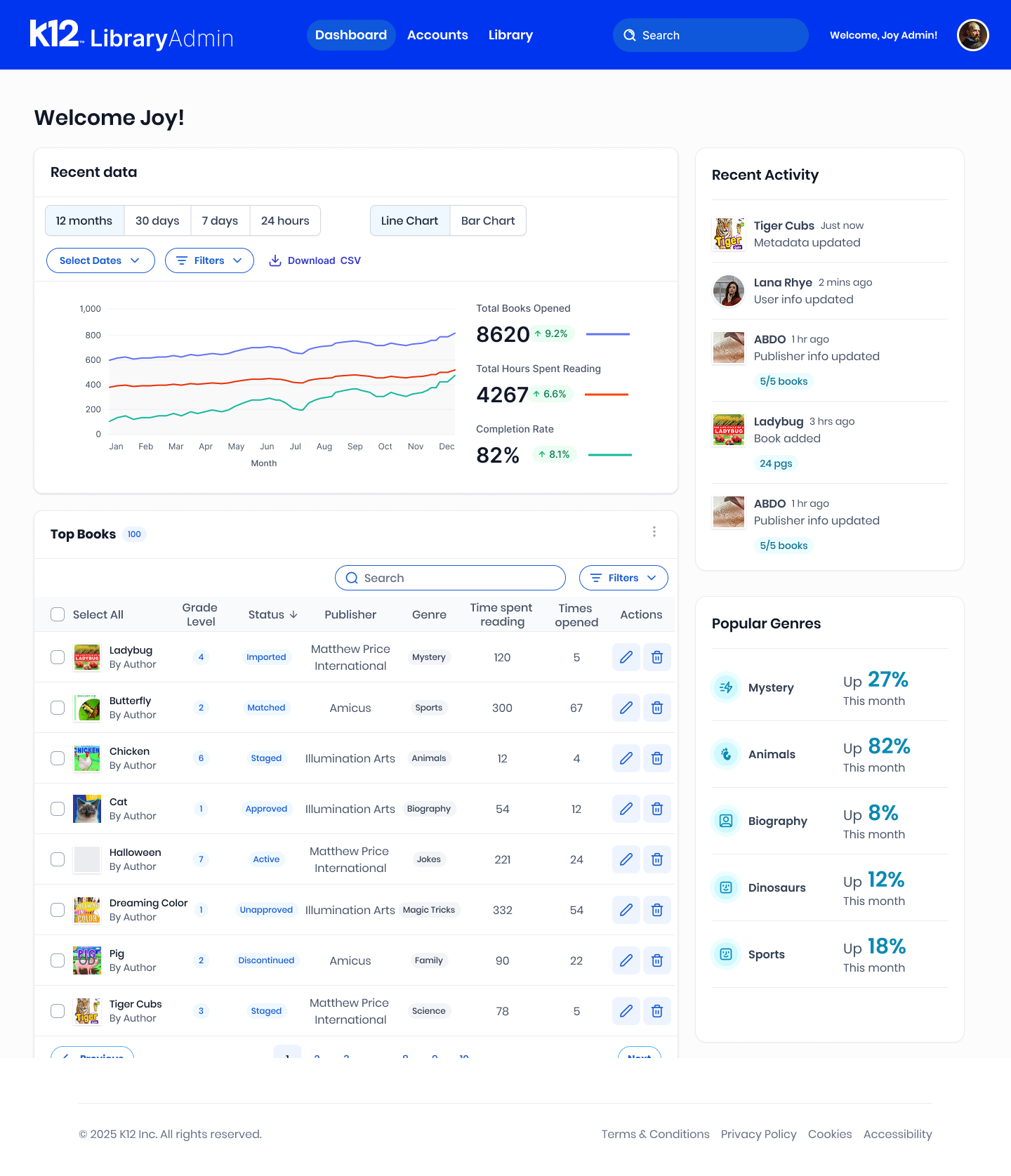
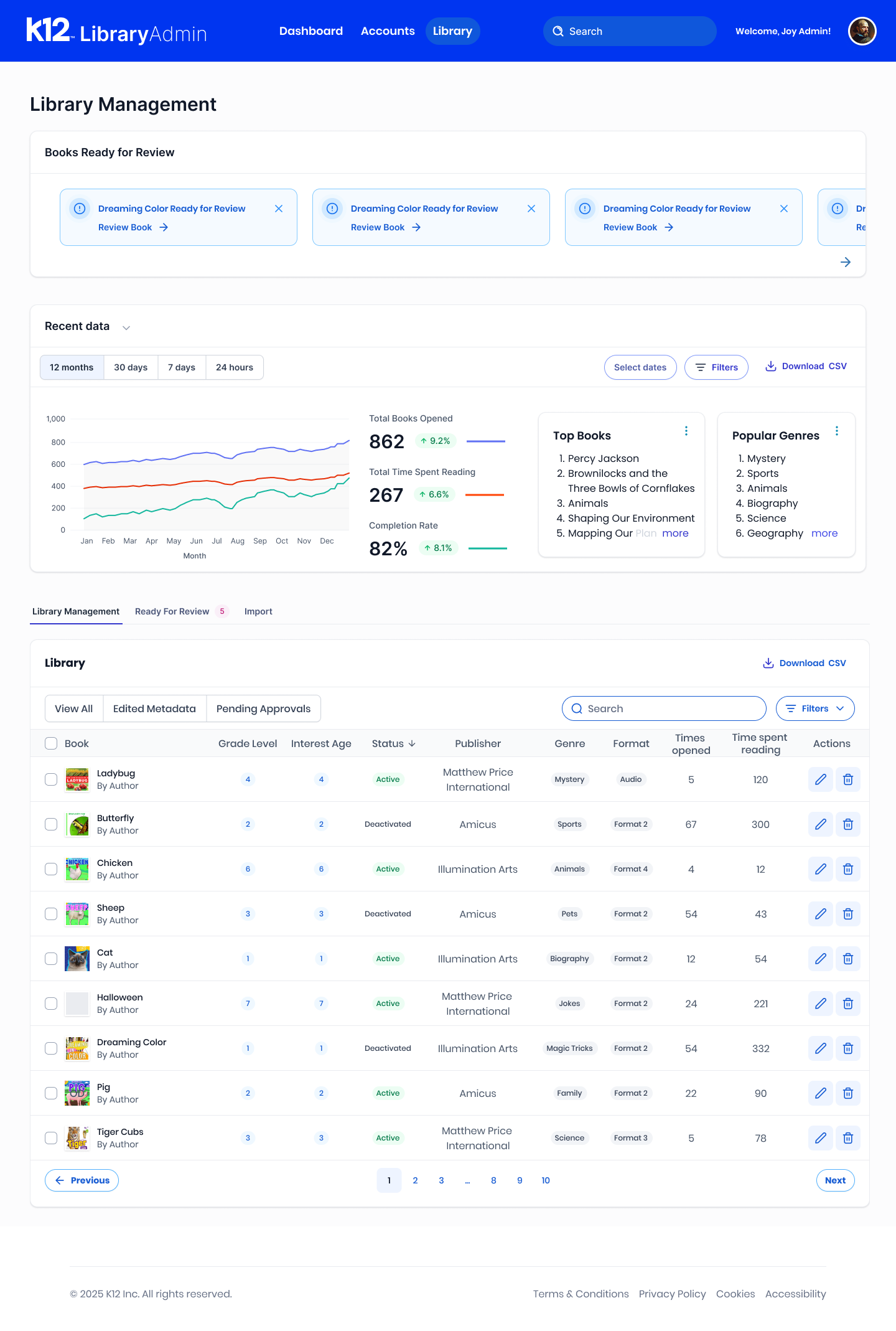
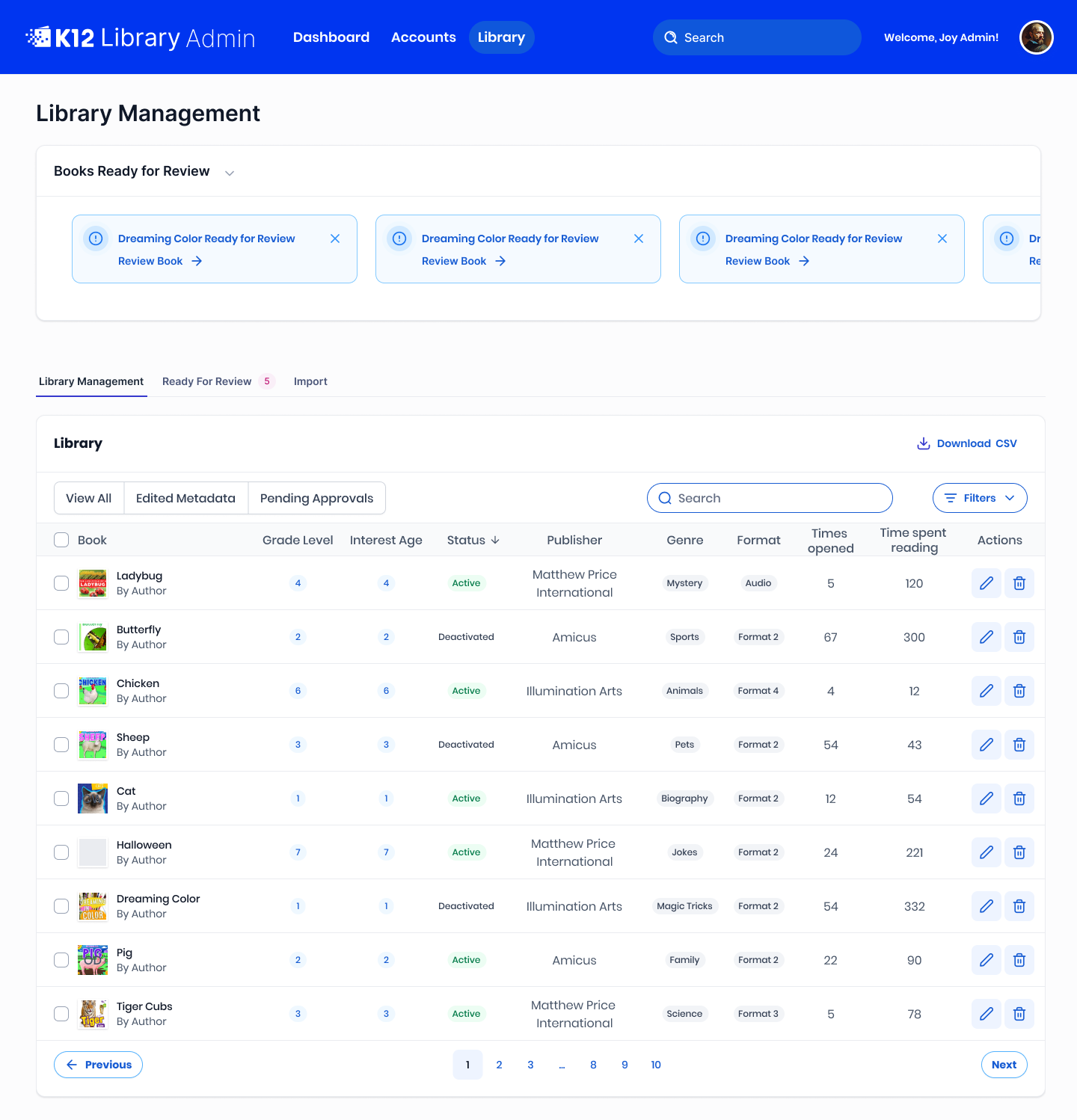
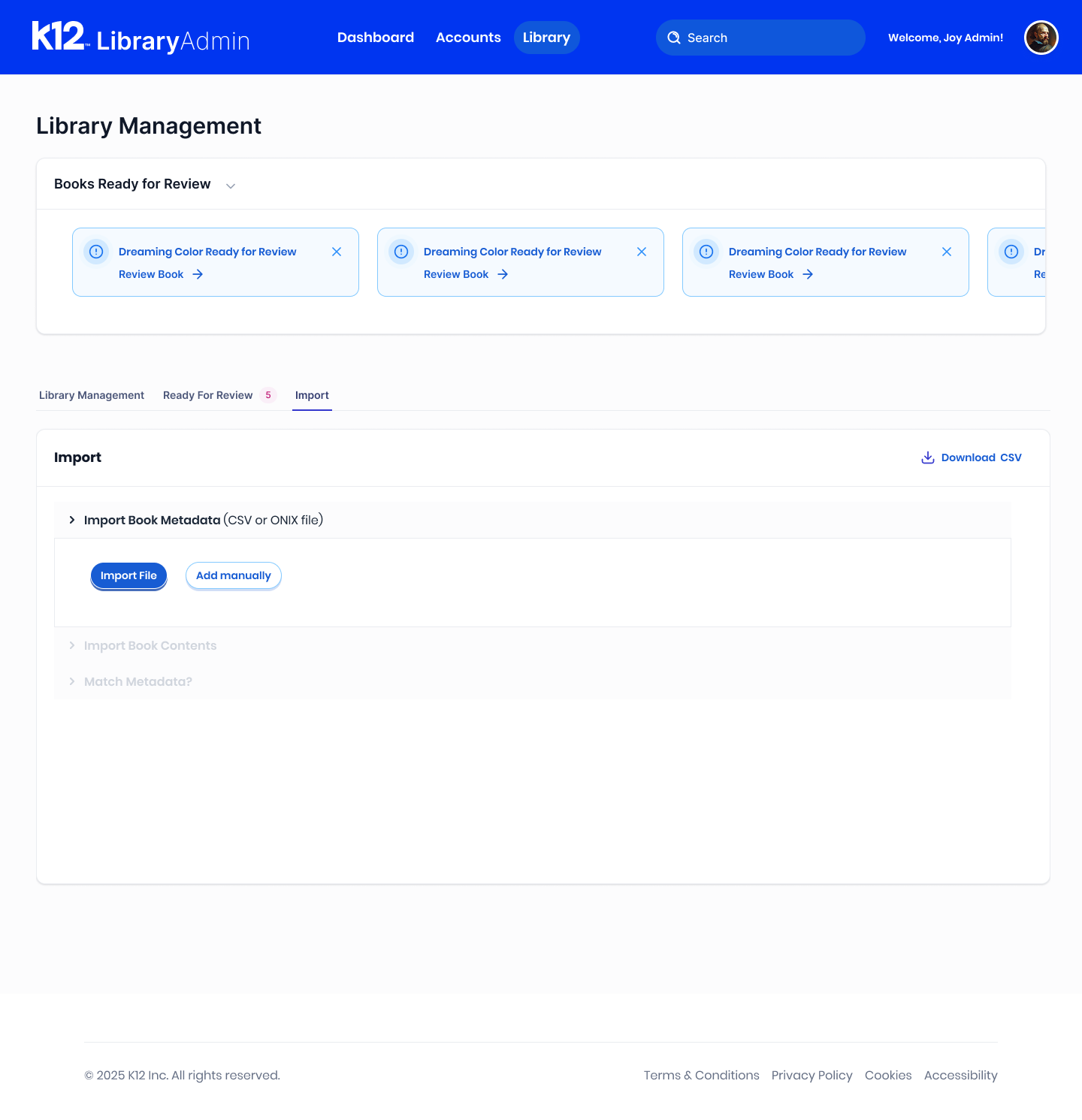
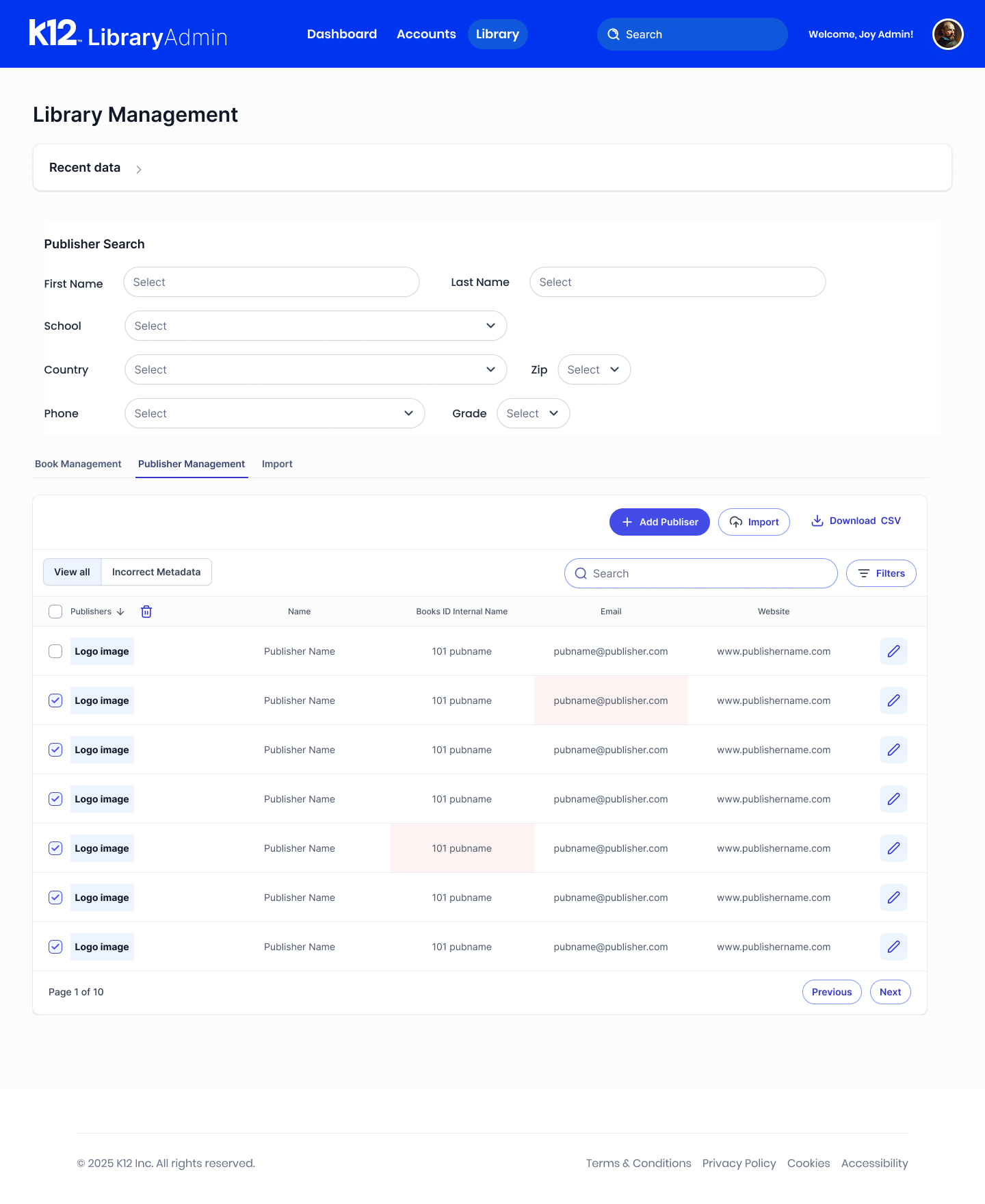
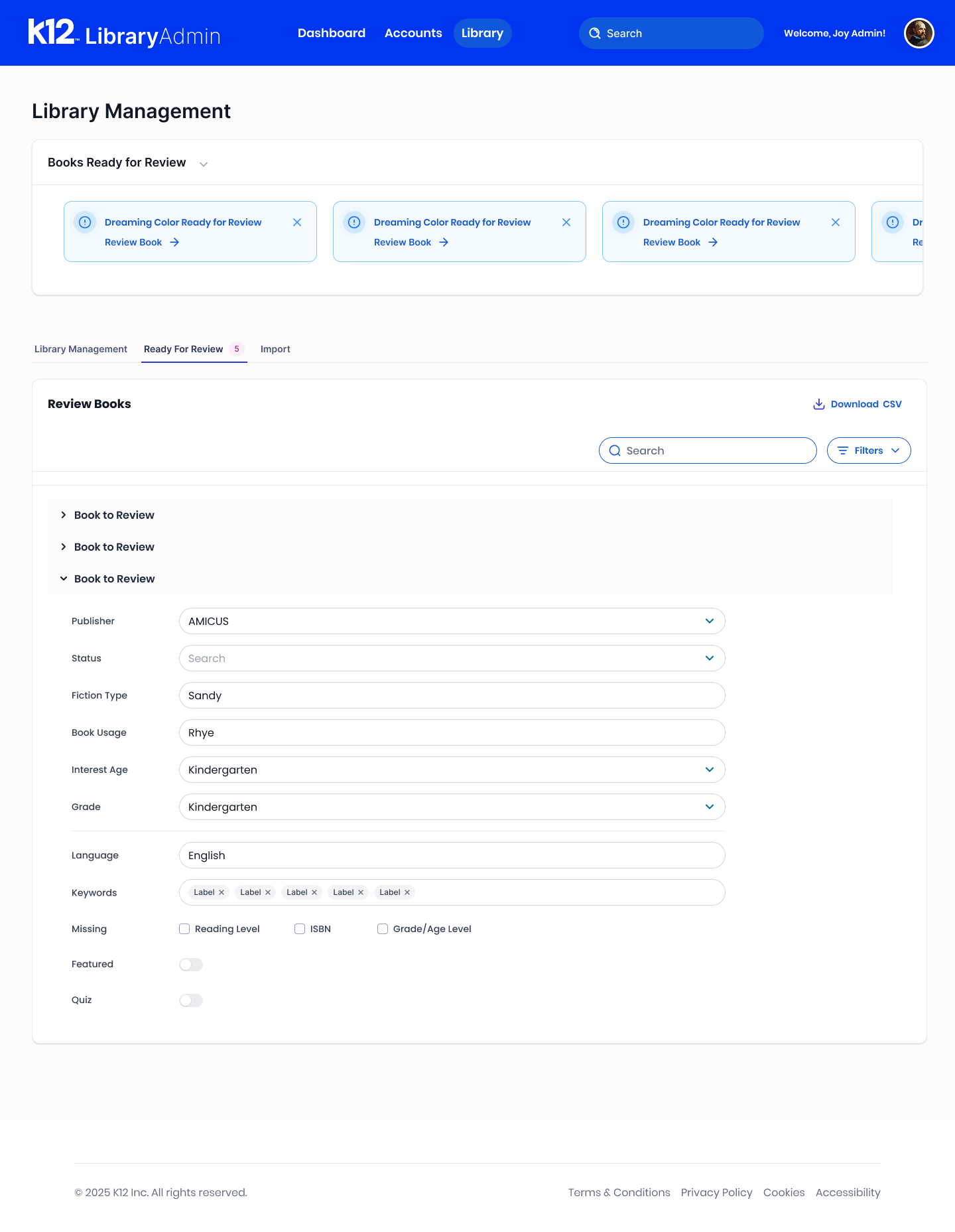
Library Admin dashboard: reading-activity charts, top books table, recent activity and popular genres Library Management with the recent-data panel expanded above the library table Library Management screen: books ready for review, tabbed library table with status, publisher, genre and format columns Ready for review tab: a book record opened for metadata review with publisher, grade, keywords and missing-field flags Publisher management: publisher search filters and a publisher table with incorrect-metadata highlighting Import tab: import book metadata by CSV or ONIX file, with book contents and metadata matching steps
K12 Library Admin — dashboard, library management, review queue, publisher records and import. Status is the organizing idea: what's active, what's pending approval, what's missing metadata, all legible from the list.

My role

Lead designer — IA, flows, visual system

Users

Librarians, district administrators, and internal support staff

Shipped

Redesigned portal, new user roles, refreshed brand

The problem

The portal was built for one kind of user and then handed to everybody. Administrators, librarians, and internal staff all saw the same wall of controls, so routine tasks meant hunting through settings that didn't belong to them — and the dangerous ones sat next to the daily ones. Nothing about the interface signalled which organisation you were acting on behalf of, which is exactly the mistake you don't want an admin to make.

Key decisions

  1. Defined real user types, then cut each view down to them. Instead of adding another filter, I gave each role a portal that shows only what that role owns — the fastest way to remove work is to remove options.
  2. Reduced the multi-step tasks people do every day. I traced the most repeated flows, collapsed the ones that were only long because of legacy screen boundaries, and moved confirmation to the moment of consequence rather than the start.
  3. Used the rebrand as a wayfinding tool. New type scale, colour, and a clear hierarchy of destructive versus routine actions — so the visual refresh did structural work instead of just looking newer.

Outcome

A redesigned portal with role-specific views, a simpler path through the tasks staff run daily, and a brand system the rest of the product could adopt. Administrators stopped needing to be trained on which controls to ignore.

Client work — screens shown on request.

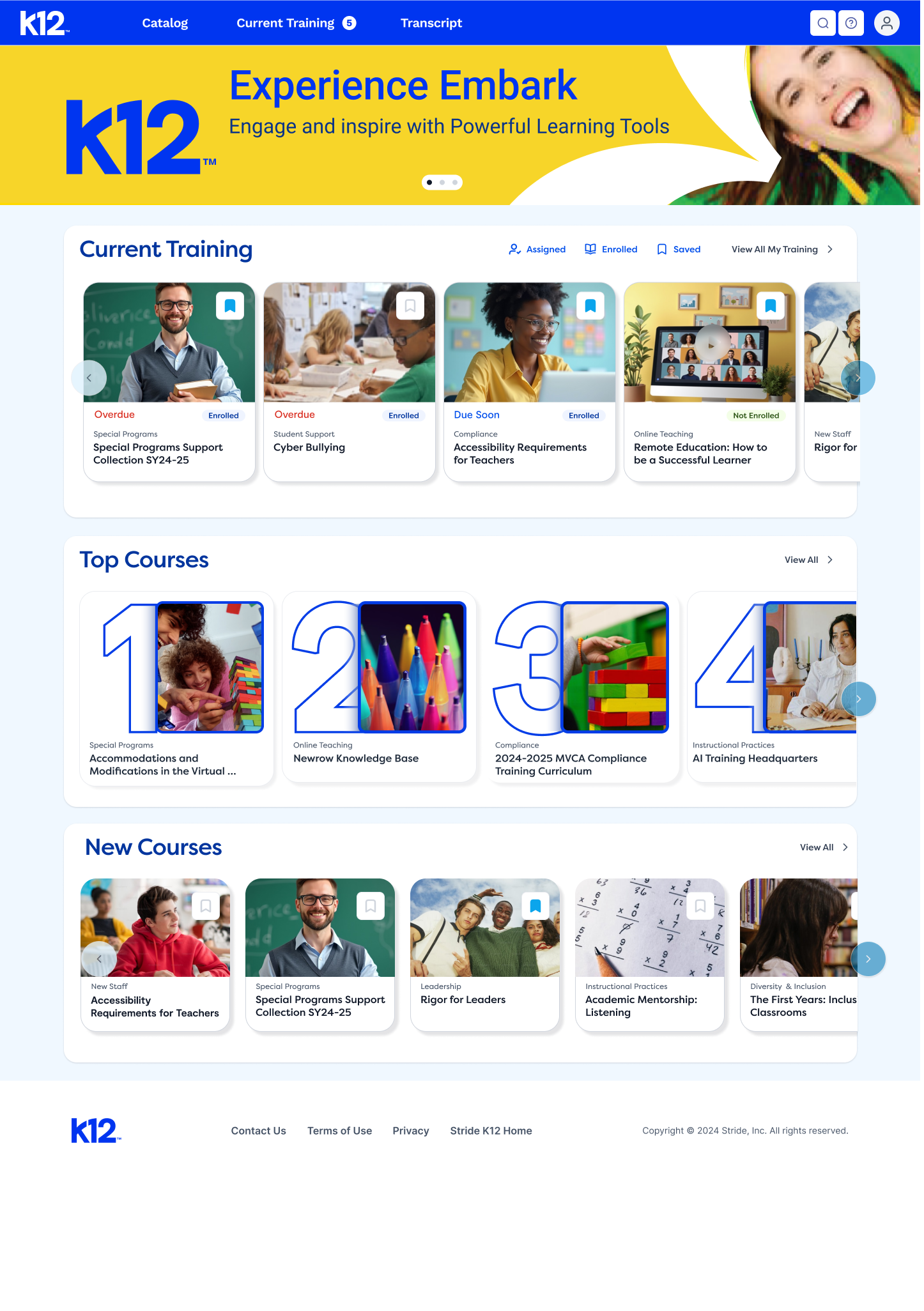
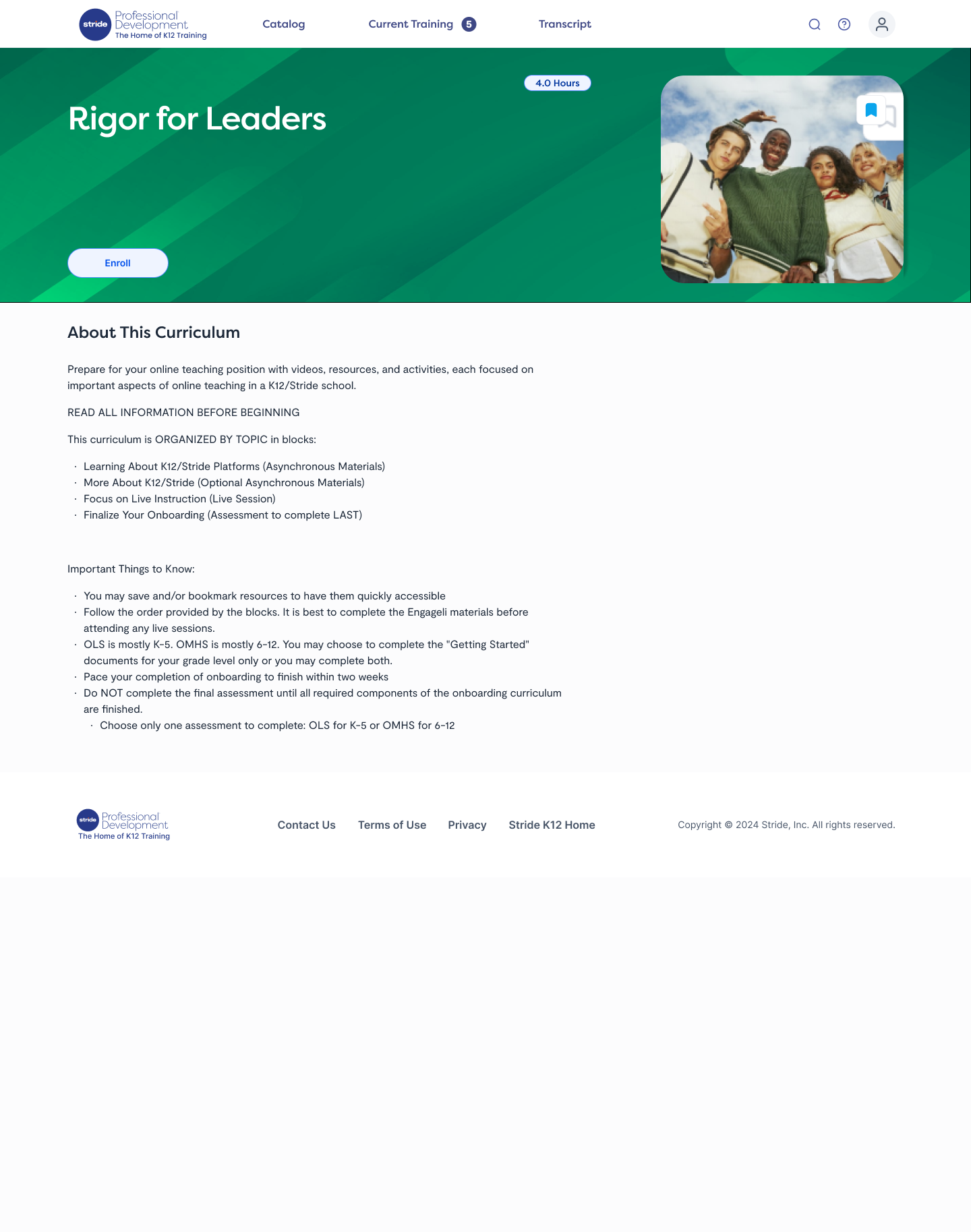
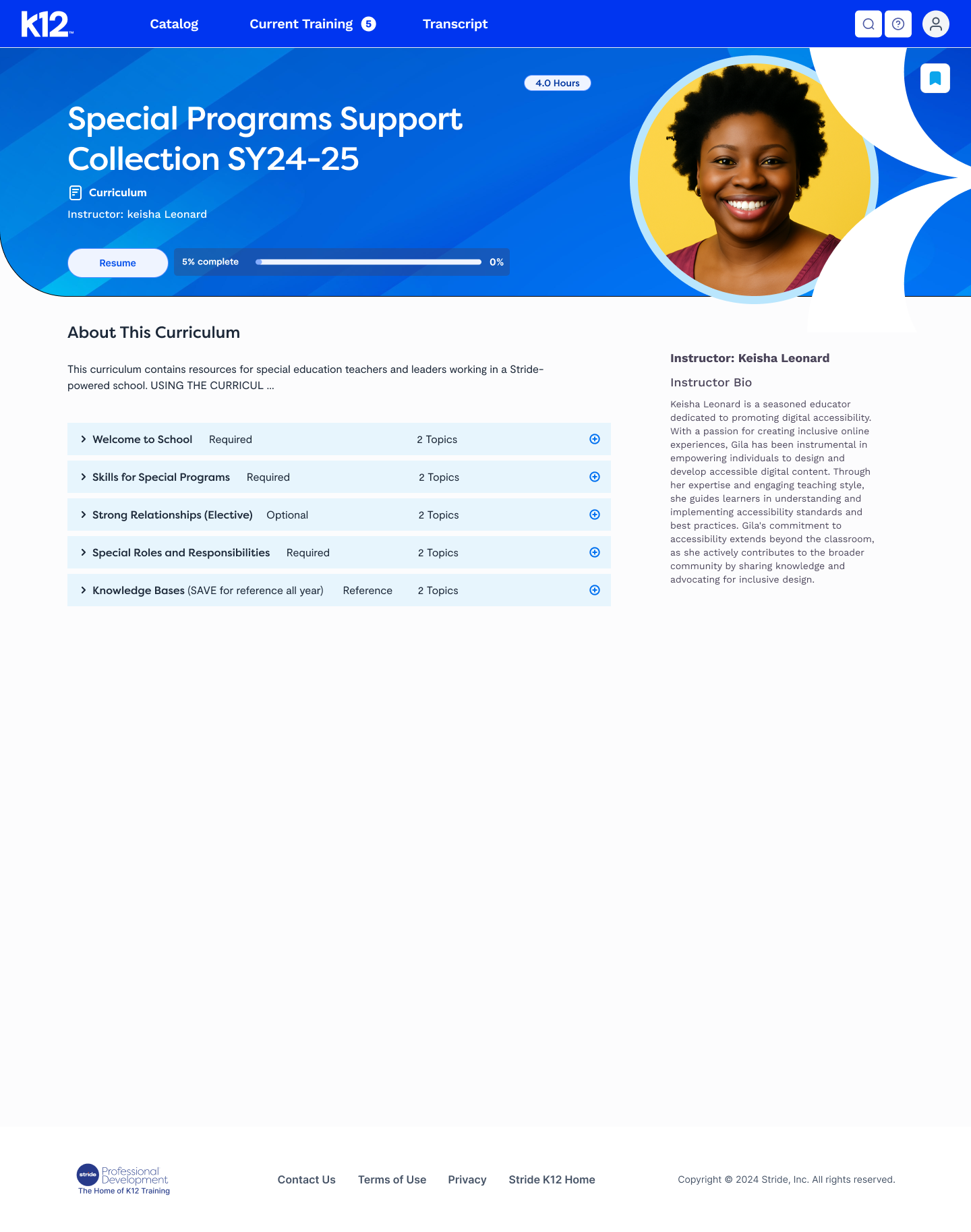
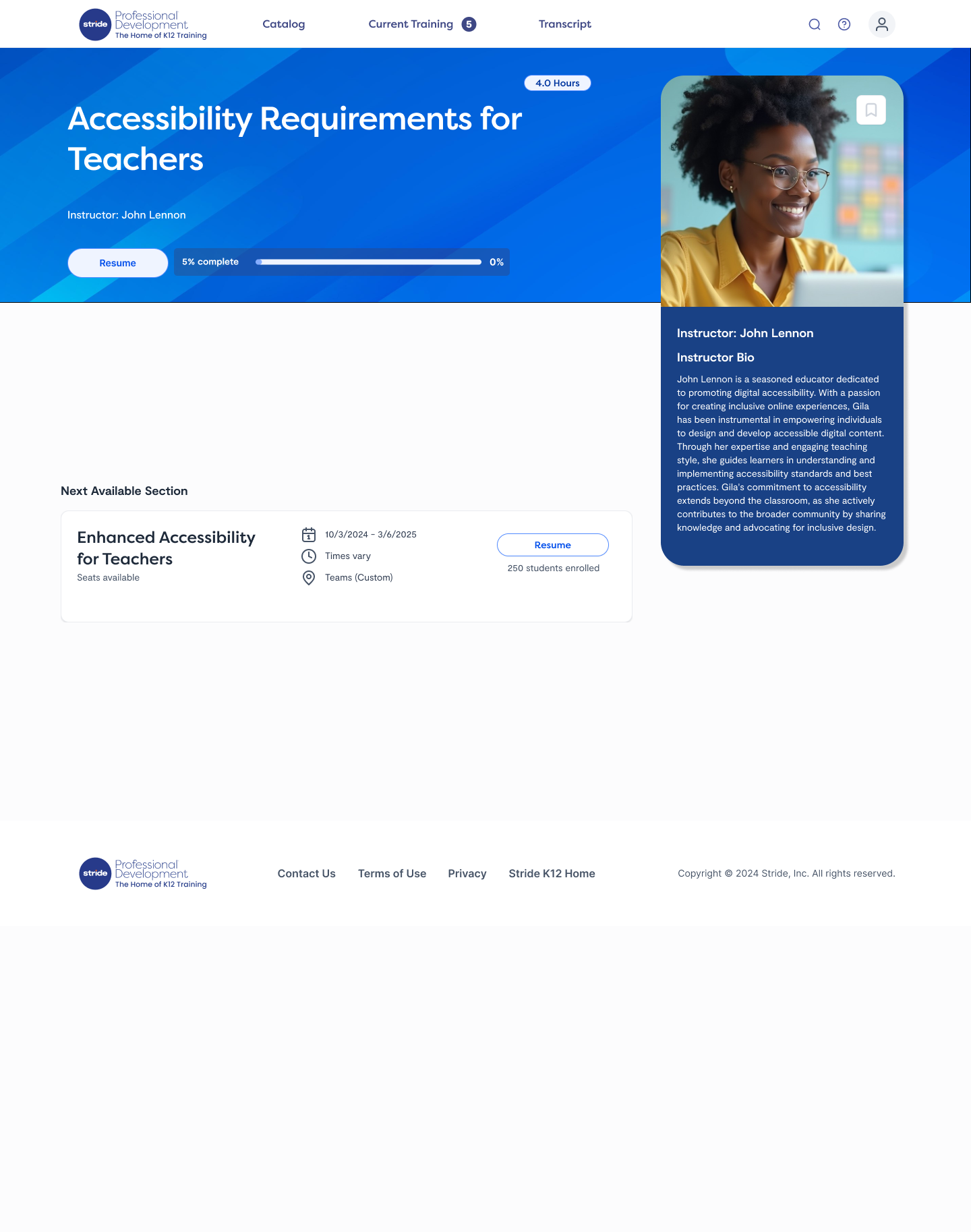
Experience Embark home page: current training, top courses and new courses rows of course cards Special Programs Support Collection curriculum page with required and optional topic blocks and an instructor bio Accessibility Requirements for Teachers course page showing progress, next available section and instructor bio Rigor for Leaders curriculum page: about the curriculum, organized topic blocks and enrollment
Experience Embark — the merged training site. One catalog, one card pattern, and course pages that answer status first: what's overdue, what's enrolled, what to resume.

My role

Lead designer — wireframes to visual design and audit

Users

Teachers and internal staff, on a school-day schedule

Shipped

Merged site, new nav model, WCAG 2.1 pass

The problem

Two training libraries were merging into one site, and each arrived with its own navigation, naming, and audience assumptions. Teachers were the people least able to absorb that: they come in with a prep period, a specific requirement to satisfy, and no patience for browsing. The question wasn't how to fit both catalogues on a page — it was how someone lands, sees what they already started, and gets back to it.

Key decisions

  1. Put in-progress training above browsing. The logged-in home leads with announcements and what you're partway through; discovery sits underneath it. Returning beats exploring for this audience.
  2. One category layer, not two taxonomies. I flattened the merged catalogues into a single browse grid with counts, so nobody has to know which of the two legacy sites a course came from.
  3. Separated internal and teacher views. Staff need enrolment and reporting; teachers need their next course. Splitting the user types kept the teacher home short enough to scan in one screen.
  4. Audited as part of design, not after launch. Contrast, keyboard order, and screen-reader labels were checked in the file — the fixes that usually arrive as post-launch tickets were already in the spec.
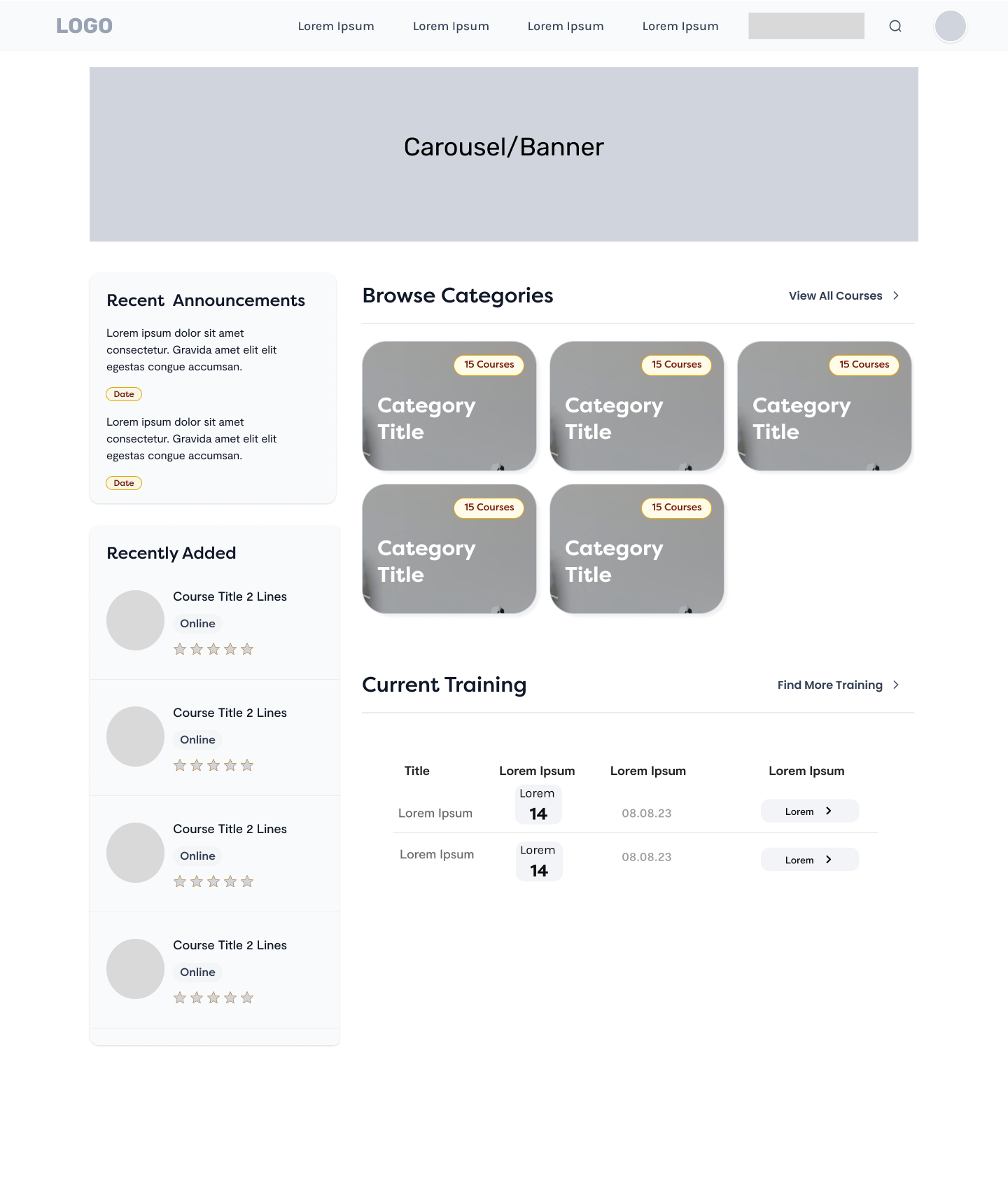
Wireframe of the logged-in home page for internal users, showing a banner, recent announcements and recently added courses in a left column, a browse-categories grid, and a current-training table
Logged-in home, internal-user variant. Note the hierarchy: announcements and in-progress work hold the left rail, category browsing takes the wide column, and current training resolves into a table rather than more cards — three different densities on one page, each matched to how often it's read.

Outcome

Two sites became one, with a navigation model built around resuming rather than browsing, distinct views for teachers and internal staff, and a brand refresh applied through a reusable style guide. Shipped keyboard-accessible and WCAG 2.1 compliant.

Timeline

ProjectContextYear
AI-assisted SaaS platform CleanSlate · Lincoln Learning 2025—
Online library admin portal Lincoln Learning Solutions 2025
Teacher professional development site Stride Learning · K‑12 2023
K12 Learning Hub games Stride Learning · K‑12 2022—24
Cognizanti journal — 3× APEX Cognizant 2016—20

About

I started in publishing, art directing children's books and a corporate journal. That's where I learned the thing I still do: figure out what the reader needs first, then design the page.

These days it's software. I lead UX on complex platforms — research sessions, flows, prototypes, the design system, the handoff — and I'm usually the person asking who exactly this screen is for. I'm a Certified Trusted Tester under Section 508, so accessibility isn't a review stage for me; it's how the file gets built.

I like the projects nobody wants to inherit: the product that grew sideways for six years, the portal with four user types and one interface. Outside of that I make things move — animation, educational games, and data visualisation are how I got here, and they still sharpen the rest.

What I do

UX research & usability testing · information architecture · rapid prototyping · design systems & branding · accessibility audits (WCAG 2.1, Section 508) · data visualisation & information design · motion and microinteractions

Tools

Figma & Figma Make · Illustrator, Photoshop, InDesign, After Effects · HTML, CSS, JavaScript · Color Contrast Analyzer, screen readers, Google accessibility tooling

Recognition

3× APEX Award for publication excellence — Cognizanti journal, 2016, 2017, 2020

Senior Interactive Designer

CleanSlate Technology · Indianapolis, IN · 2025–present

Design lead on a complex AI-capable SaaS platform. Two user types from concept to handoff, research sessions with users, and the product's first design library and rebrand.

Senior Interactive Designer

Stride Learning · Reston, VA · 2022–2025

Interactive K‑12 learning products: UI/UX prototypes, educational games for the K12 Learning Hub, data-driven infographics, reusable design systems, and accessibility audits with usability testing behind them.

Designer / Art Director

Cognizant Technology · Teaneck, NJ · 2008–2022

Visual design for multi-platform digital work across finance and insurance — app UIs, interactive infographics, animation, landing pages. Designed and launched Cognizanti, the company's flagship journal, which earned three APEX Awards.

Earlier

Freelance · Reader's Digest Children's Publishing

Art direction and interactive design for Scholastic, Pearson Education, Standard & Poor's and PwC. Before that, art director on children's and novelty publishing with Disney, Mattel and the Jim Henson Company. BFA, Syracuse University.